


You set up a chatbot. You thought it would handle customer queries automatically. But your customers are still frustrated. Tickets are piling up. And your bot is either saying nothing helpful or saying the wrong thing entirely.
If your chatbot is not working the way you expected, you are not alone. Most Shopify brands run into the same issues. The good news? Most of these problems are fixable. This blog breaks down the five most common chatbot mistakes and exactly what you can do to fix them.
Mistake 1: Your Chatbot Not Working Because It Was Never Properly Trained
This is the most common issue. A lot of shopify brand owners install a chatbot, answer a few setup questions, and assume it is ready to go. It is really not.
A customer service chatbot needs real data to work well. It needs your:
- FAQs (actual questions your customers ask, not the ones you think they ask)
- Product catalog with accurate descriptions
- Return and refund policies
- Shipping timelines by region or carrier
- Past ticket history so it can learn from real conversations
Without this foundation, your bot gives vague or wrong answers. Customers lose trust fast. According to Salesforce's State of the Connected Customer report, 88% of customers say the experience a company provides matters as much as its products.
Quick Fixes
1) Audit your bot's knowledge base every month.
2) Add new products, update policies, and review conversations where the bot failed.
3) Treat training as ongoing, not a one-time setup.
Mistake 2: Your Chatbot Not Working After a Store Update (Chatbot Maintenance)
You updated the bot once. Great. But then you launched a new collection, changed your return window, or switched shipping carriers and forgot to update the bot.
Chatbot maintenance is not optional. It is as critical as keeping your website live. When your store changes, your bot needs to change too.
Here is what gets missed most often:
A bot giving outdated information is worse than no bot at all. It actively misleads customers. A shopper asking about a return window gets a wrong answer, contacts your team anyway, and now you have handled the same ticket twice.
Quick Fixes
Set a recurring calendar reminder, monthly at minimum, to review and update your chatbot's training data. After any major store update, do an immediate sweep. Assign one specific person to own this. It takes 30 minutes a month and saves hours of damage control.
Mistake 3: No Chatbot Fallback Message When the Bot Gets Stuck
Every bot will eventually hit a question it cannot answer. That is normal. What is not okay is when the bot loops, goes silent, or sends a generic "I don't understand" and leaves the customer hanging.
A chatbot fallback message is what your bot says when it does not have an answer. Most brands either skip setting this up or set it up poorly.
A weak fallback sounds like:
"Sorry, I didn't understand that. Please try again."
A strong fallback sounds like:
"I don't have the right answer for this one. Let me connect you with our support team and they'll get back to you within 2 hours."
The difference is significant. One leaves the customer stuck. The other gives them a clear path forward.
Quick Fixes
Write 3 to 5 fallback message variations. Rotate them so conversations do not feel robotic. Always include a clear next step: a live chat handoff, a support email, or a link to your help center. Never leave a customer without direction.
Mistake 4: Underestimating Whether AI Chatbots Can Make Mistakes
People often ask: can AI chatbot make mistakes? The honest answer is yes, and more often than most store owners expect.
This is one of the core limitations of AI chatbots that gets underestimated. AI models can:
- Hallucinate and confidently give wrong information
- Misread intent and answer a different question than what was asked
- Fail on edge cases like unusual requests, multi-part questions, or sarcasm
- Give outdated answers if not regularly retrained with fresh data
- Mix up products especially in large catalogs with similar SKUs
These chatbot mistakes are not rare. They happen daily in live Shopify store environments. A customer asking "can I return a sale item?" might get a confident wrong answer if your policy is not clearly documented in the bot's training data.
Take Gymshark as an example. They run frequent sales and limited drops, and their return policies shift with each campaign. If their chatbot is not updated right after a policy change, customers asking about returns during a sale get the wrong answer confidently. By the time the team catches it, hundreds of conversations have already gone sideways.
Quick Fixes
Never run a fully autonomous chatbot without human oversight. Set up quality checks. Review flagged or escalated conversations weekly. Use tools that let human agents see and correct bot responses in real time. Platforms like Gorgias, Tidio, and kim.cc (which pairs AI automation with human agent review) help teams catch and correct errors before they reach the customer.
Mistake 5: Your Chatbot Not Working for Complex or Emotional Queries
Chatbots handle repetitive, straightforward questions well. They are not built to handle a customer who just received a damaged product and is upset about it.
This is one of the most important limitations of AI chatbots to understand. AI for customer support lacks genuine empathy. It can simulate it to a degree. But when a customer is frustrated, they can tell when they are talking to a machine.
Common failure points:
- Escalation triggers are not set up, so the bot keeps trying to solve something it cannot
- Sentiment detection is off, and the bot misses emotional cues in the message
- No human handoff exists, so there is no live agent to step in when needed
- Response tone is too robotic, and customers feel unheard
Studies from McKinsey show that customers who have a bad support experience are 3x more likely to switch to a competitor. One bad bot interaction can undo months of good brand work.
Quick Fixes
Build a clear escalation path. Any message with emotional language like "angry," "frustrated," "damaged," "wrong," or "refund" should trigger an immediate handoff to a human agent. Think of your chatbot as the first line. A human should always be the safety net.
How to Know If Your Chatbot Is Actually Working
Before you fix anything, measure the current state. Here are the key metrics to track:
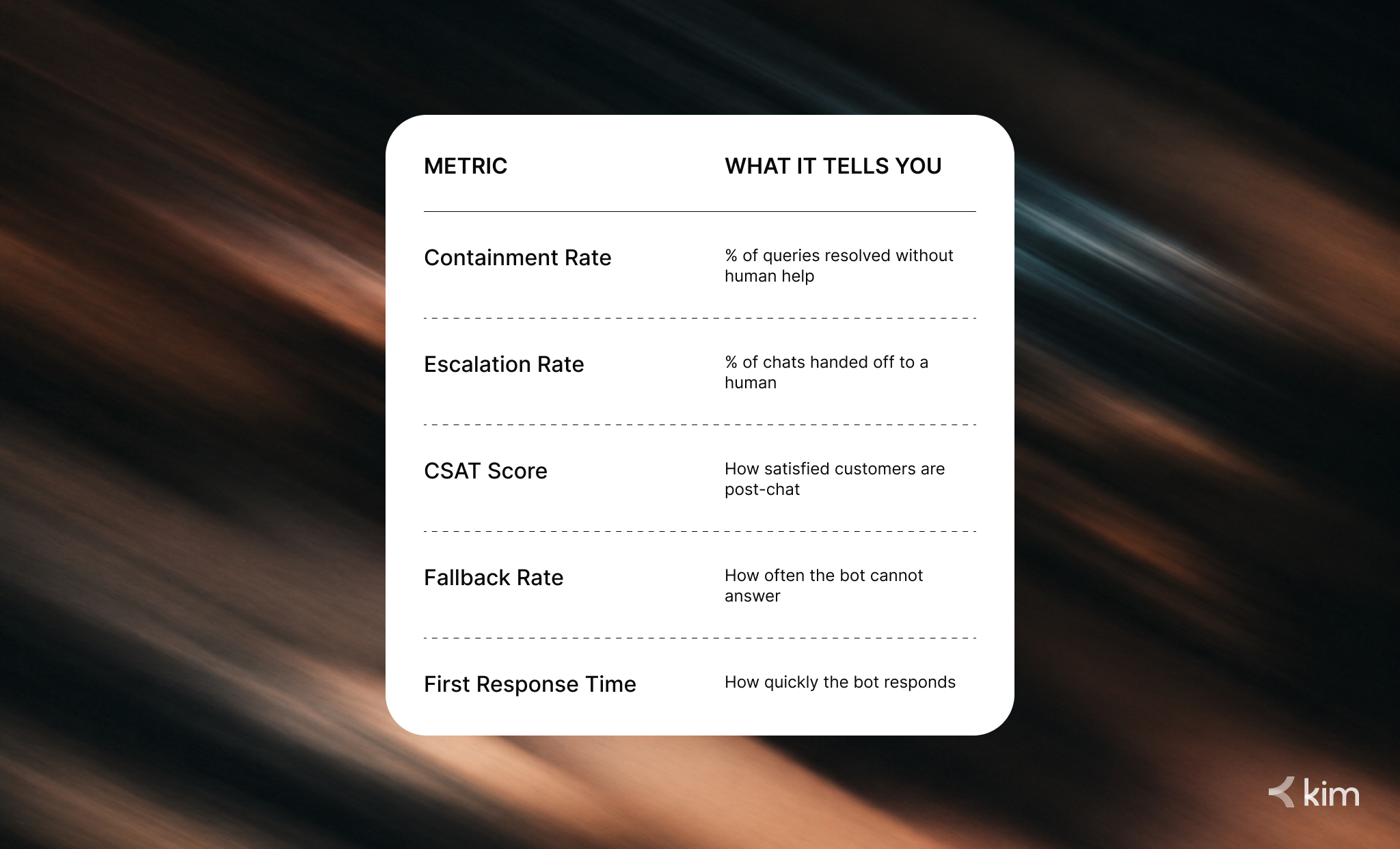
If your containment rate is below 50%, your bot needs more training. If your fallback rate is above 20%, your knowledge base has gaps. These numbers will tell you exactly where to focus.
FAQ
Q: Why is my chatbot not working even after I set it up correctly?
A: Setup is just the beginning. Chatbots need ongoing training, regular content updates, and human oversight to stay accurate. Check your knowledge base, review recent conversations, and update any outdated information.
Q: Can AI chatbots make mistakes on customer support queries?
A: Yes. AI chatbots can hallucinate, misread intent, or give outdated answers. This is why human oversight is essential, especially for complex or emotional queries.
Q: What is a chatbot fallback message and why does it matter?
A: A fallback message is what your bot says when it cannot answer a question. A good fallback gives the customer a clear next step, like connecting them to a human agent, instead of leaving them stuck.
Q: How often should I do chatbot maintenance?
A: At minimum, once a month. After any major store update including new products, policy changes, or new carriers, do an immediate review. Treat your chatbot like a team member that needs regular check-ins.
Q: What are the main limitations of AI chatbots in e-commerce?
A: AI chatbots struggle with complex queries, emotional conversations, multi-part questions, and edge cases. They also require constant retraining to stay accurate as your store evolves.
Q: When should a chatbot escalate to a human agent?
A: Whenever a customer expresses frustration, asks something outside the bot's scope, or when the issue involves returns, damaged goods, or billing disputes. Always have a human fallback ready.
Conclusion
If your chatbot is not working the way it should, the fix is almost never a technical one. It is an operational one. You need better training data, smarter fallback messages, regular chatbot maintenance, and humans in the loop for when things go wrong.
AI for customer support is powerful, but only when it is built and managed correctly. The Shopify brands winning at customer experience right now are not the ones with the fanciest chatbot. They are the ones who have combined AI speed with human judgment.
If your chatbot is dropping the ball on customer queries, it is time to rethink your support setup entirely.
Want a support system that actually works? AI-powered, human-vetted, and built for Shopify brands.


